📢 New Review: Best Action Cameras Under ₹10,000 — Read Now →

Prerequisites & Hardware

Transferring WhatsApp data across operating systems without a PC requires a paid third-party application. There is no official free method.

  • Hardware: A Type-C to Lightning cable (or an OTG adapter).
  • Battery: Android device must be at a minimum of 50% battery (it will drain faster as it charges the connected iPhone during transfer).
  • Software: iCareFone Transfer App or Wutsapper.

Step 1: Prepare the iPhone

  • Navigate to Settings > Apple ID > Find My.
  • Turn off Find My iPhone. You will need to enter your Apple ID password. (Re-enable this after the transfer is complete).

Step 2: Prepare the Android Backup

  • Install the transfer app on your Android device.
  • Select the Android to iPhone transfer option.
  • Open WhatsApp settings and create a Local Backup. Disable the Google Drive backup option temporarily.

Step 3: Data Parsing and Verification

  • Enter your WhatsApp mobile number in the transfer app.
  • Input the 6-digit OTP code. The app will parse your local Android backup (messages, photos, videos) and convert it into an iOS-readable format.
  • Purchase the required app subscription when prompted to proceed.

Step 4: Physical Connection & Transfer

  • Connect both phones directly using the Type-C to Lightning cable.
  • On the iPhone, an alert will appear. Tap Trust This Computer and enter your iPhone passcode.
  • Initiate the transfer in the Android app. Wait for completion (e.g., a 9GB backup takes roughly 20 minutes). Do not disconnect the cable.

Step 5: Critical iPhone Restoration Step

  • Once the app displays “Transfer Succeeded,” open WhatsApp on the iPhone.
  • Agree to the terms and enter your mobile number for OTP verification.
  • CRITICAL FAILURE POINT: When prompted by iCloud to restore a backup, you must tap Skip Restore. Tapping “Restore” will overwrite your newly transferred direct data with an empty or outdated iCloud backup, forcing you to restart the entire process.
  • Set up your profile name. Your transferred chats and media will populate immediately.
Resources

🎬 Watch the full comparison test on TechShatabdi

P
6Tested
3 WksTesting
₹OwnPurchased
Affiliate Disclosure: This article contains affiliate links. If you buy through our links, we earn a small commission at no extra cost to you. This doesn't influence our test results or recommendations. Learn more →
[METHODOLOGY]

How TechShatabdi Tests

Every camera is purchased with our own money. No review units. No sponsored content. Each is tested across 5 real-world scenarios:

Motion Stabilization

Mountain bike trail + city jog + scooter. We capture and score shutter on a 1–10 scale.Mountain bike trail + city jog + scooter. We capture and score shutter on a 1–10 scale.

Low-Light Quality

Indoor at 100 lux and outdoor at midnight. Noise, colour accuracy, and usability scored.

Waterproof Test

3 minute pool submersion at rated depth, then 5 minutes at +2m beyond rated spec.3 minute pool submersion at rated depth, then 5 minutes at +2m beyond rated spec.

Battery Endurance

Continuous recording at 4K/30fps until shutdown. Measured to the minute.

Get the Full Budget Creator Kit

Free PDF: Complete camera + accessories checklist under ₹25,000, plus weekly deal alerts.

Join 500+ creators. No spam. Unsubscribe anytime.

Prefer watching over reading?

Full comparison video with raw footage samples on TechShatabdi YouTube.

🏆 Our Top Pick

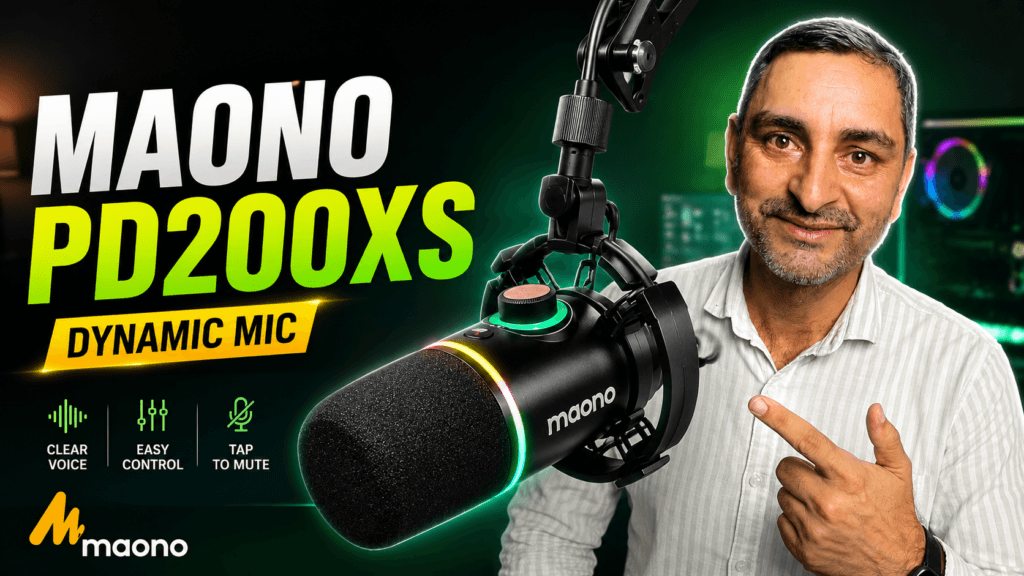
Maono PD200XS review Maono PD200X review

Maono PD200XS: Studio Audio in Untreated Rooms for ₹4,000

Watch the Full Review on YouTube The Maono PD200XS is a dual-mode dynamic microphone that eliminates background noise without requiring

Browse by Category

📬 New Review Alerts

Every product bought with our own money. No freebies, no spGet notified when TechShatabdi publishes a new test. Free, weekly, no spam.onsored opinions. Tested for weeks before a word gets written.

Join 500+ readers

Scroll to Top